In Part 1, I laid out the architectural premise: building a hybrid personal server on a Raspberry Pi 5 with a dedicated static IP, backed by 100% filesystem isolation, transactional SQLite, and a three-repository ecosystem.
This post goes under the hood of the HostPanel Core Gateway (portald). We will examine how the core gateway orchestrates packages as isolated loopback daemons, how it routes API traffic with HMAC tokens, how React micro-frontends mount dynamically at runtime, how PowerDNS leverages SQLite views for zero-reload DNS, and how long-running operations stream live terminal output via Server-Sent Events (SSE).
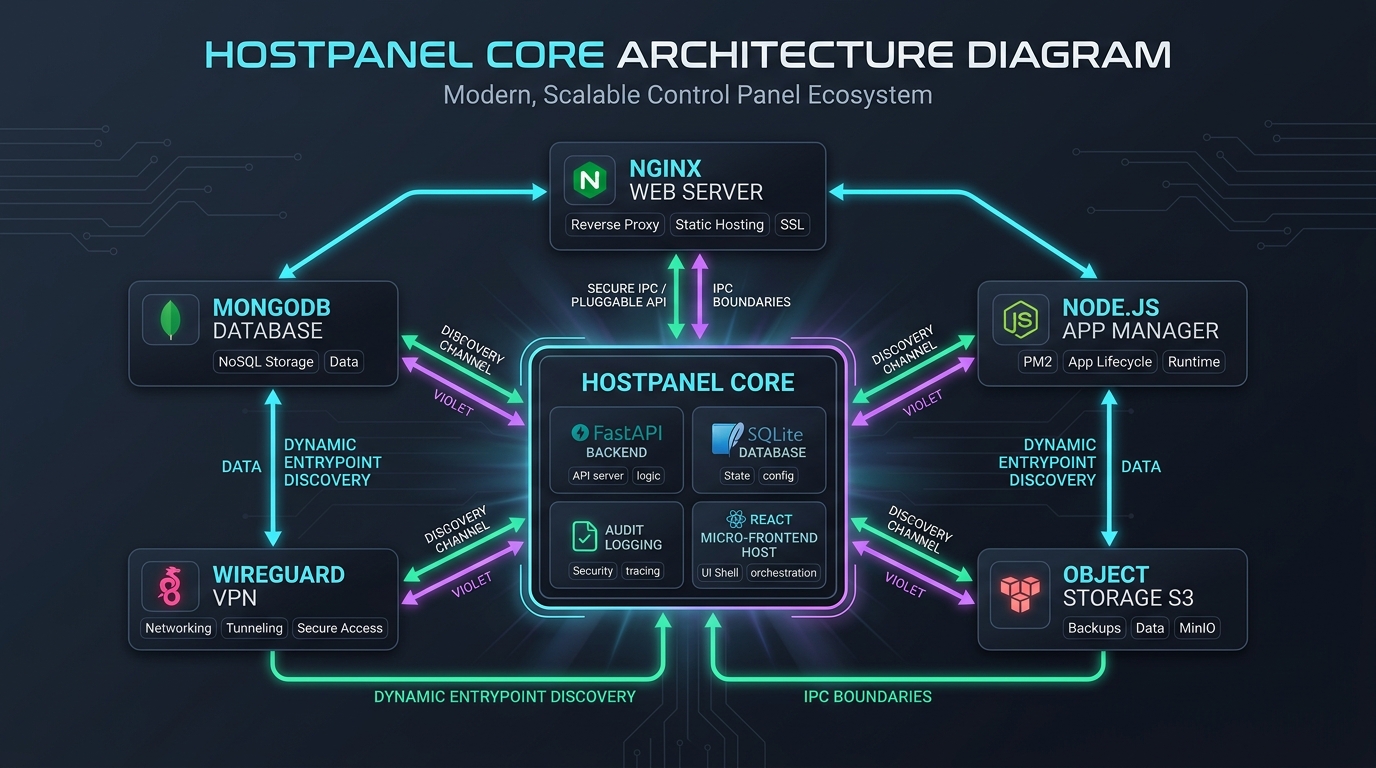
1. Process Privilege Separation & The Loopback Daemon Model
In early prototypes, packages were dynamically loaded Python modules running inside the main API process via setuptools entry points. That design was fragile: a blocking call, a synchronous database lock, or an unhandled exception in an experimental package could degrade the entire web gateway.
In HostPanel v3, I moved to a micro-daemon model with process privilege separation. The Core Gateway (portald) runs as a dedicated, unprivileged system user (hp-portal), listening on port 2081.
Every package runs as its own standalone systemd service daemon (hostpanel-<pkg>d.service) under its own dedicated system user (hp-nginx, hp-php, hp-wireguard, hp-nodejs):
┌────────────────────────────────────────────────────────────────────────┐
│                   HostPanel Core Gateway (portald)                     │
│                   User: hp-portal  •  0.0.0.0:2081                     │
└──────────────┬──────────────────────────┬──────────────────────────────┘
               │ Loopback (127.0.0.1)     │ Loopback (127.0.0.1)
               │ X-HostPanel-Token (HMAC) │ X-HostPanel-Token (HMAC)
               ▼                          ▼
┌──────────────────────────────┐  ┌──────────────────────────────┐
│  hostpanel-nginxd (Port 9100)│  │   hostpanel-phpd (Port 9104) │
│  User: hp-nginx              │  │   User: hp-php               │
└──────────────┬───────────────┘  └──────────────┬───────────────┘
               │ Restricted Sudo                 │ Restricted Sudo
               ▼                                 ▼
        ops/hp-nginx                      ops/hp-php
Dynamic Port Allocation (9100–9199)
When a package is installed, the core reads its manifest.json, allocates a permanent loopback port from the 9100–9199 range, and persists it in hostpanel.db and /opt/hostpanel/etc/<pkg>.env:
| Package | Allocated Port | Daemon Service | System User | Role |
|---|---|---|---|---|
nginx | 9100 | hostpanel-nginxd.service | hp-nginx | Edge reverse proxy, vhosts, upstream pools |
filemanager | 9101 | hostpanel-filemanagerd.service | hp-filemanager | Web file browser & syntax editor |
websites | 9102 | hostpanel-websitesd.service | hp-websites | Docroot provisioning & domain binding |
apache | 9103 | hostpanel-apached.service | hp-apache | Apache 2.4 server & .htaccess engine |
php | 9104 | hostpanel-phpd.service | hp-php | PHP 8.4 management & extension catalog |
wireguard | 9105 | hostpanel-wireguardd.service | hp-wireguard | VPN tunnel & QR peer exporter |
nodejs | 9106 | hostpanel-nodejsd.service | hp-nodejs | Node.js process supervisor |
Authenticated Loopback Proxying with HMAC Tokens
External access to ports 9100–9199 is blocked by default. All client requests hit the Core Gateway on port 2081.
When an authenticated user invokes a package API (e.g., /cpanelapi/packages/php/pools), portald acts as a reverse proxy, forwarding the request to 127.0.0.1:9104. To ensure daemons only accept traffic originated by the core gateway, portald signs each request with an HMAC SHA-256 token passed via the X-HostPanel-Token header. The package daemon validates the timestamp and signature before executing the handler.
Restricted Sudo Elevation via ops/
Package daemons do not run as root. When a package must perform an elevated task—such as bringing up a WireGuard interface (wg-quick up wg0) or reloading Nginx—it calls a strictly validated bash script (ops/hp-<pkg>) via a dedicated rule in /etc/sudoers.d/hostpanel-<pkg>. Arbitrary commands cannot be injected; only validated operations defined in the ops runner are permitted.
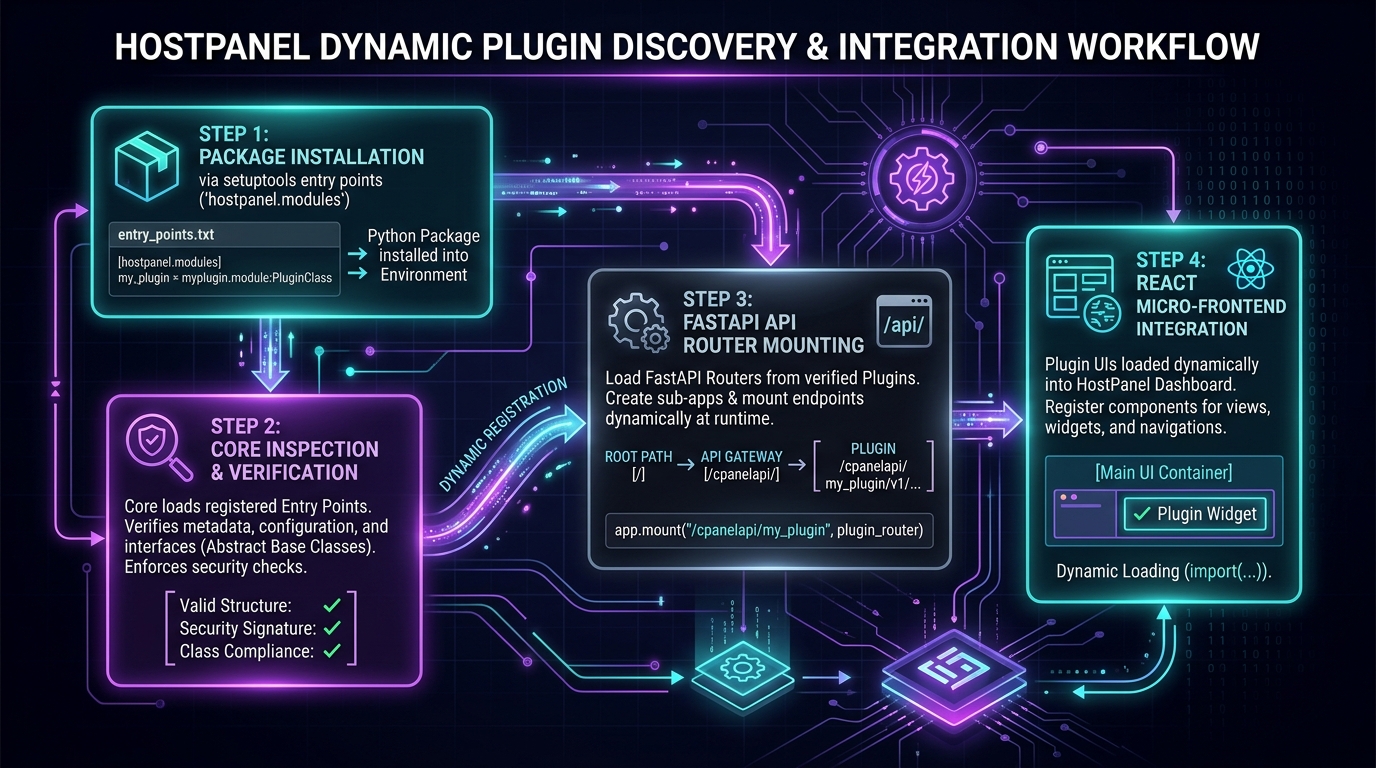
2. Dynamic Micro-Frontend Mounting
HostPanel's user interface is a React 18 Single Page Application (SPA). To keep the core decoupled from package UI code, the frontend uses a micro-frontend runtime architecture.
Each package repository contains its own React/TypeScript frontend that compiles to a standalone bundle:
packages/<slug>/frontend/
├── src/
│   ├── index.tsx
│   └── components/
└── dist/
    └── main.js       # Pre-compiled micro-frontend bundle
When the Core Gateway initializes, it reads each package's manifest.json:
{
  "name": "wireguard",
  "version": "3.0.0",
  "title": "WireGuard VPN",
  "category": "Network & Security",
  "port": 9105,
  "entry": "packages/wireguard/dist/main.js",
  "routes": [
    { "path": "/wireguard", "title": "WireGuard VPN", "icon": "Shield" }
  ]
}
The core UI shell loads main.js dynamically into the browser runtime. The micro-frontend registers its views into the core navigation menu and renders natively inside the dashboard shell, using shared design tokens, alerts, and authentication state without requiring a rebuild of the core SPA.
3. Transactional SQLite Persistence & PowerDNS Views
Configuration and operational state live in a single, unified database: /opt/hostpanel/data/hostpanel.db.
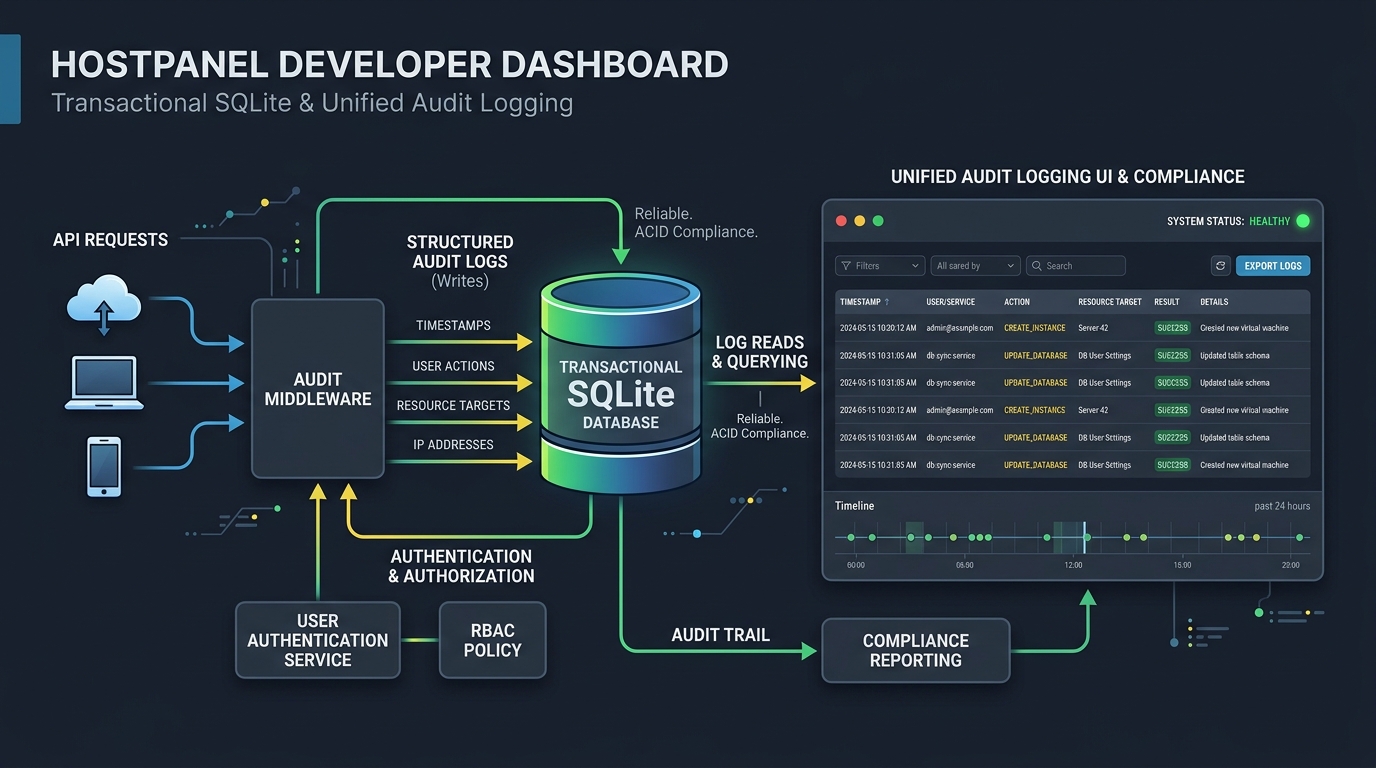
Concurrency Guarantees with WAL Mode
To support concurrent reads from the core web gateway and multiple package daemons while write transactions are being committed, SQLite operates in Write-Ahead Logging (WAL) mode:
PRAGMA journal_mode = WAL;
PRAGMA busy_timeout = 5000;
PRAGMA synchronous = NORMAL;
All database interactions run through a context-managed connection factory (get_conn()), ensuring that transactions commit cleanly or roll back automatically on failure without leaving locked files.
Zero-Reload DNS via PowerDNS SQLite Views
One of the key engineering advantages of this architecture is how HostPanel integrates with PowerDNS.
PowerDNS runs as an authoritative nameserver on port 53 using the gsqlite3 backend, configured via /opt/hostpanel/etc/pdns.conf. Instead of maintaining a separate DNS database or requiring systemctl reload pdns every time a record changes, PowerDNS reads from SQLite views mapped directly to HostPanel's native tables:
CREATE VIEW IF NOT EXISTS domains AS
SELECT id, name, master, last_check, type, notified_serial, account
FROM dns_zones;

CREATE VIEW IF NOT EXISTS records AS
SELECT id, domain_id, name, type, content, ttl, prio, disabled, auth
FROM dns_records;
When a user adds an A record, a subdomain, or an automated ACME _acme-challenge TXT record for SSL verification, the API writes a single row into dns_records. PowerDNS resolves the record on port 53 immediately. No file templating, no zone reloads, and zero lag.
4. Real-Time Terminal Streaming via Server-Sent Events (SSE)
In infrastructure management, hiding long-running operations behind a static loading spinner is a critical UX failure. When downloading a 90MB pre-compiled MongoDB binary from hostpanel-binaries or extracting a standalone PHP runtime, operators need to see what is happening in real time.
HostPanel enforces a strict rule: no operational commands may swallow output with >/dev/null 2>&1.
Every provisioning action, binary download, and service restart streams unbuffered stdout and stderr line-by-line to the UI using Server-Sent Events (SSE):
@router.get("/packages/{slug}/stream")
async def stream_package_operation(slug: str, action: str):
    async def event_generator():
        cmd = ["/opt/hostpanel/bin/hp-pkg-runner", slug, action]
        process = await asyncio.create_subprocess_exec(
            *cmd,
            stdout=asyncio.subprocess.PIPE,
            stderr=asyncio.subprocess.STDOUT,
        )
        while True:
            line = await process.stdout.readline()
            if not line:
                break
            yield f"data: {json.dumps({'line': line.decode('utf-8')})}\n\n"
        await process.wait()
        yield f"data: {json.dumps({'exit_code': process.returncode})}\n\n"

    return StreamingResponse(event_generator(), media_type="text/event-stream")
The React terminal modal attaches to the SSE stream, displaying real-time execution logs with standardized progress markers:
[1/4] ==> Fetching standalone runtime: php-8.4-aarch64.tar.gz
[2/4] ==> Verifying SHA-256 checksum... OK
[3/4] ==> Extracting to /opt/hostpanel/runtimes/php/8.4/
[4/4] ==> Starting hostpanel-php8.4-fpm.service...
  ✓ PHP 8.4 runtime active on /opt/hostpanel/run/php/php8.4-fpm.sock
5. Mandatory Audit Logging
Every state-changing API call writes to the immutable audit_log table. Whether an operator adds a WireGuard peer, restarts Nginx, updates an S3 bucket ACL, or provisions a virtual host, the audit logger records the mutation:
audit.log_action(
    username=current_user.username,
    action="wireguard.peer_create",
    target=f"wg0/peer_{peer_id}",
    status="success",
    details=f"ip=10.8.0.5, public_key={pubkey}"
)
The audit log is displayed directly in the dashboard, giving system operators a complete, queryable history of all administrative actions taken on the machine.
What's Next in Part 3
With the Core Gateway (portald), loopback micro-daemons, SQLite views, and real-time SSE streaming established, the next post explores how HostPanel handles edge web routing and security over a static IP.
In Part 3, we will dive into:
- The Nginx Package: Dynamic server block generation and reverse proxying (
proxy_pass) to internal runtimes. - Automated SSL: Issuing Let's Encrypt certificates via ACME webroot and PowerDNS RFC2136 DNS challenges.
- Hybrid Routing: Directing public domains to web applications while keeping internal admin services strictly accessible over the WireGuard tunnel.
Repository: Developer-Geekay/hostpanel